
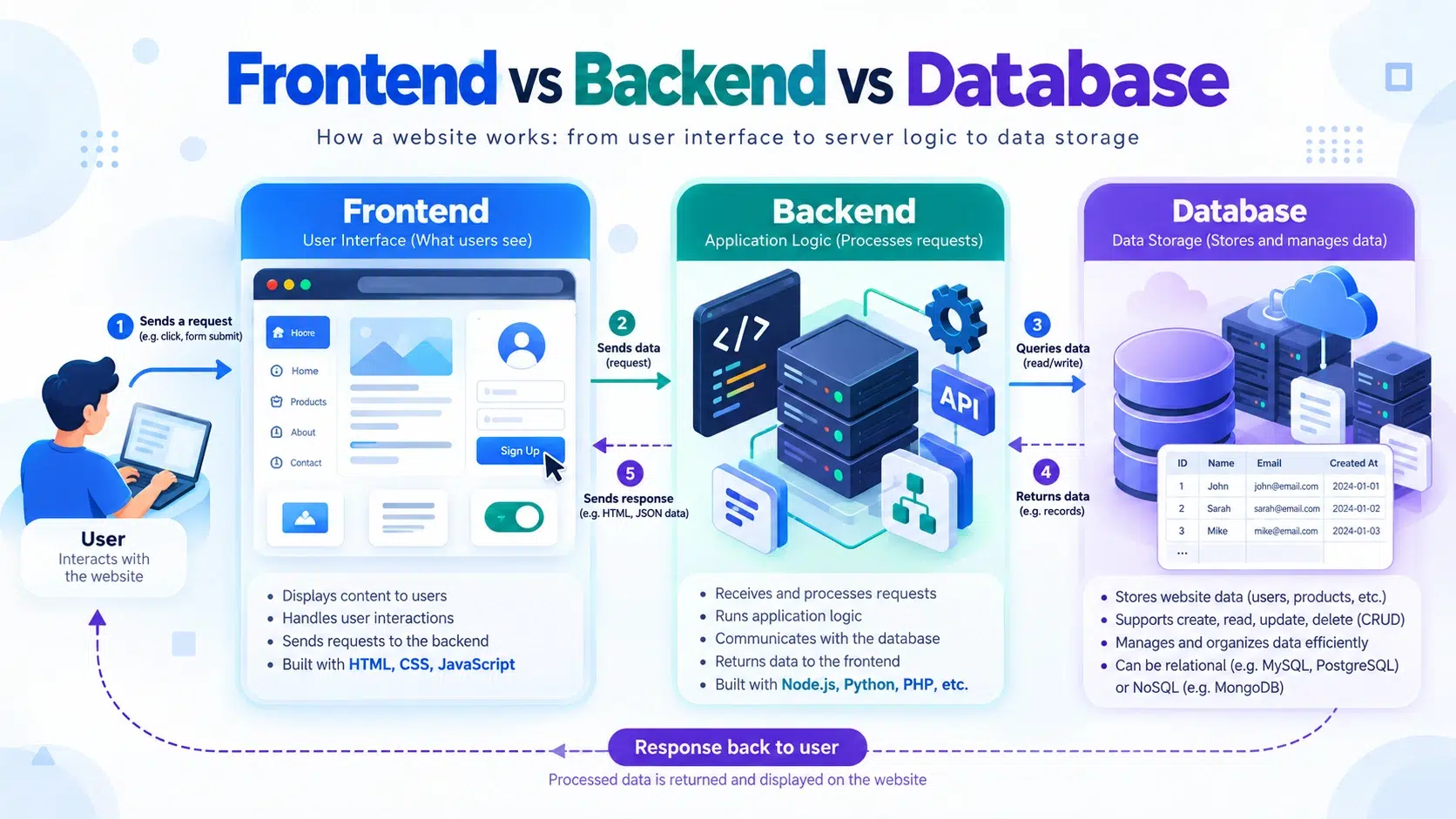
Direktorat Sistem dan Teknologi Informasi – In website and application development, there are three main components that work together: frontend, backend, and database. Each component has a different function, but they are interconnected to create a system that users can use effectively.
For beginners who are learning website development, understanding the differences between frontend, backend, and database is an important step before learning more advanced web technologies.
What Is Frontend?
Frontend is the part of a website or application that users can directly see and interact with.
When someone opens a website in a browser, elements such as menus, buttons, images, forms, banners, article pages, and navigation are all part of the frontend.
Frontend is responsible for the visual appearance and user experience, also known as User Experience (UX).
Some commonly used technologies in frontend development include:
HTML for creating the structure of web pages.
CSS for managing design, colors, sizes, positioning, and page appearance.
JavaScript for making web pages more interactive.
Frameworks and libraries such as React, Vue.js, Angular, and Bootstrap.
For example, when a user clicks the Login button, the frontend receives the username and password input and sends the data to the backend for processing.
What Is Backend?
Backend is the part of a website or application that works behind the scenes and is not directly visible to users.
The backend is responsible for running application logic, processing data, handling user authentication, communicating with the database, and sending processed results back to the frontend.
Some technologies commonly used for backend development include:
PHP
Python
Java
Node.js
Ruby
Go
.NET
Popular backend frameworks include:
Laravel
Django
Express.js
Spring Boot
CodeIgniter
For example, when a user logs in, the backend receives the username and password from the frontend. The backend then checks the information in the database.
If the data is correct, the system grants access to the user.
What Is a Database?
A database is a system used to store and manage data for a website or application.
The stored data may include user information, articles, products, transactions, comments, website settings, and other information required by the application.
Some widely used database systems include:
MySQL
MariaDB
PostgreSQL
Microsoft SQL Server
Oracle Database
MongoDB
For example, a WordPress website uses a database to store various types of information such as:
Usernames
Encrypted passwords
Articles or posts
Website pages
Comments
Plugin configurations
Theme configurations
Website information
When a visitor opens an article, the system retrieves the article data from the database and displays it through the frontend.
Differences Between Frontend, Backend, and Database
In simple terms, the differences between frontend, backend, and database can be understood based on their main functions.
| Component | Main Function | Example Technologies |
|---|---|---|
| Frontend | Displays the interface used by users | HTML, CSS, JavaScript, React, Vue |
| Backend | Processes application logic and requests | PHP, Python, Node.js, Java |
| Database | Stores and manages data | MySQL, MariaDB, PostgreSQL, MongoDB |
Frontend can be compared to the front area of a restaurant, where customers view the menu and place their orders.
Backend can be compared to the restaurant kitchen, where customer orders are processed.
Meanwhile, the database can be compared to a storage room, where ingredients and important information are kept.
All three components work together so that the system can operate properly.
How Do Frontend, Backend, and Database Work Together?
To understand how these three components interact, we can use the login process as an example.
Suppose a user logs in by entering a username and password.
The process works as follows:
The user opens the login page through the frontend.
The user enters a username and password.
The frontend sends the data to the backend.
The backend processes the login request.
The backend requests user information from the database.
The database sends the required information to the backend.
The backend checks whether the login information is correct.
The backend sends the result back to the frontend.
The frontend displays the user page if the login is successful.
The process can be described simply as:
User → Frontend → Backend → Database
The response then travels back through:
Database → Backend → Frontend → User
Examples of Frontend, Backend, and Database in WordPress
WordPress is a good example of a web application that uses frontend, backend, and database together.
WordPress Frontend
The WordPress frontend is the part of the website that visitors can see.
Examples include:
Homepage
Navigation menu
Articles
Galleries
Sliders
Forms
Footer
Profile pages
These elements are usually managed using a WordPress theme, Elementor, Divi, Gutenberg, or other page builders.
WordPress Backend
The WordPress backend is the part that manages processes behind the website.
Examples include:
WordPress Dashboard
Article management
User management
Plugin settings
Theme settings
Login processes
Form processing
WordPress is primarily developed using the PHP programming language.
WordPress Database
WordPress commonly uses MySQL or MariaDB as its database system.
The database stores information such as:
Posts
Pages
Users
Comments
Categories
Settings
Plugin data
Theme settings
Because of this, the database is one of the most important components in WordPress backup and recovery processes.
Can Frontend Work Without Backend?
Frontend can work without a backend if the website only contains static pages.
For example, a simple website built using only HTML and CSS can be displayed without a backend or database.
However, if the website requires features such as:
User login
Registration
Forms
Transactions
Comments
Dashboard
Account management
Information systems
then a backend is usually required.
Can Backend Work Without a Database?
Backend can work without a database in certain applications.
However, most modern applications require a database because the system needs to store and retrieve information continuously.
For example, an e-commerce website needs a database to store:
Product data
Customer data
Inventory
Orders
Transaction history
Payment information
Without a database, this information would be difficult to manage permanently.
Who Develops the Frontend and Backend?
In software development, there are several types of professionals with different responsibilities.
Frontend Developer
A Frontend Developer is responsible for developing the visual interface of a website that users interact with.
Their responsibilities may include:
Creating website layouts
Managing responsive design
Creating navigation menus
Building forms
Connecting the frontend to APIs
Improving the user experience
Backend Developer
A Backend Developer is responsible for developing systems that work behind the application.
Their responsibilities may include:
Creating APIs
Managing authentication
Handling application business logic
Connecting applications to databases
Developing security systems
Optimizing server performance
Database Administrator
A Database Administrator, also known as a DBA, is responsible for managing databases.
Their responsibilities may include:
Managing databases
Creating backups
Performing restores
Managing database users
Optimizing queries
Maintaining data security
Monitoring database performance
There is also a role called a Full Stack Developer, which refers to a developer who has skills in both frontend and backend development.
Conclusion
Frontend, backend, and database are three important components in website and application development.
The frontend is responsible for the interface that users directly interact with. The backend runs the application logic and processes user requests. Meanwhile, the database is used to store and manage data.
In simple terms:
Frontend = Interface
Backend = Processing
Database = Data Storage
These three components work together so that a website can receive user input, process information, store data, and display the results back to users.
Understanding the differences between frontend, backend, and database provides a strong foundation before learning more about website development, WordPress, servers, APIs, and other modern web technologies.