
Direktorat Sistem dan Teknologi Informasi – When building a website, there are two important components that need to be understood: domain and hosting. Both have different functions, but they work together so that a website can be accessed through the internet.
For beginners, the terms domain and hosting are often considered the same. In fact, a domain functions as the website address, while hosting is used as the storage space for all website data.
Understanding the meaning of domain and hosting is an important first step before creating a website, managing WordPress, or learning more about website development.
What Is a Domain?
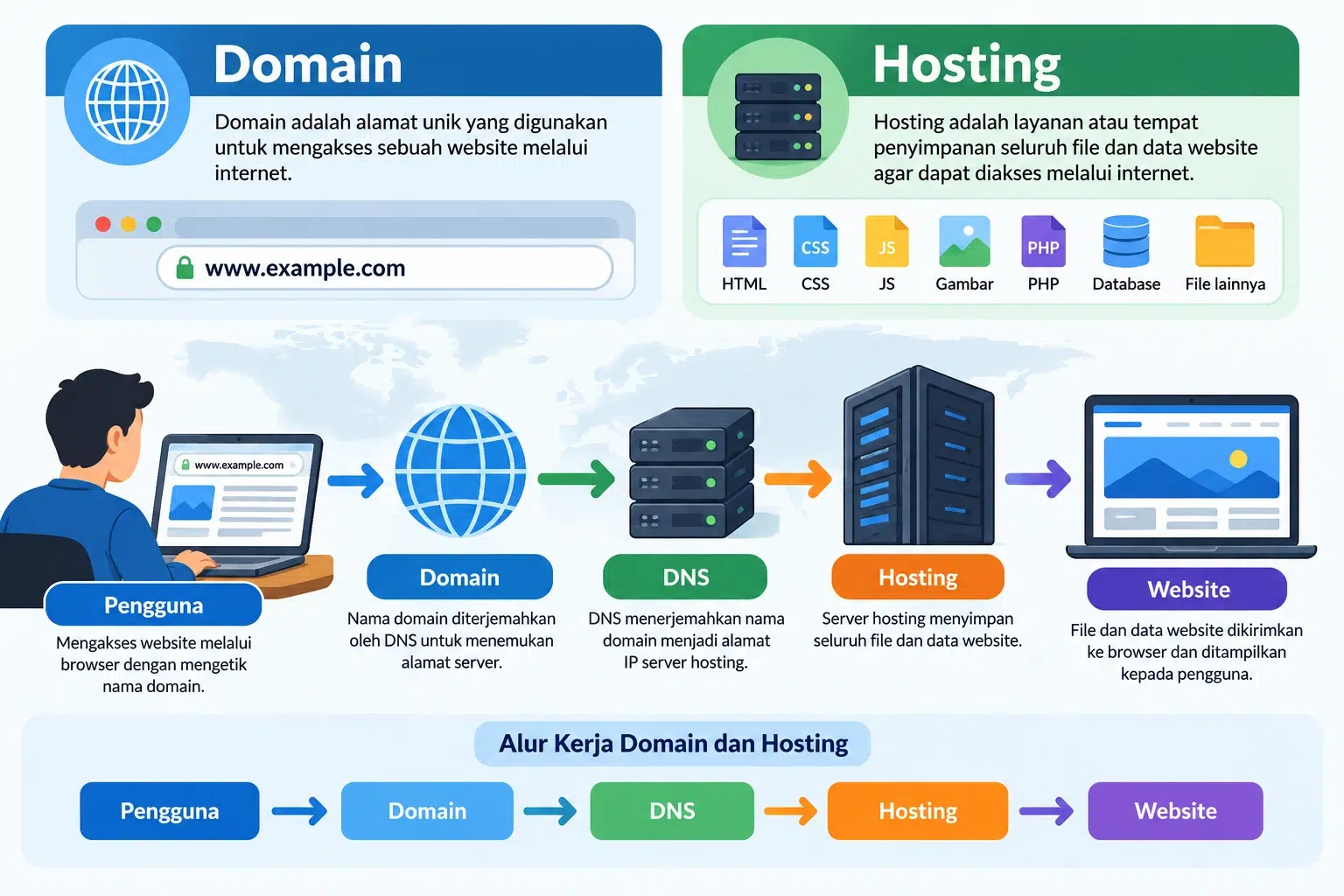
A domain is a unique address used to access a website on the internet.
Without a domain, users would need to access a website using a server IP address, which usually consists of a series of numbers and is more difficult to remember.
Examples of domains include:
google.com
wordpress.org
undip.ac.id
example.com
A domain makes a website easier to recognize and remember.
For example, instead of typing an IP address such as:
192.168.1.10
users can simply access:
example.com
The domain then directs the user to the server where the website is hosted.
Functions of a Domain
A domain has several important functions.
1. As a Website Address
A domain is used as an address that users can type into a browser to open a website.
For example:
2. Makes a Website Easier to Remember
A domain name is easier to remember than a server IP address.
Because of this, choosing a simple and relevant domain name is very important.
3. Builds Website Identity
A domain can be used as the identity of an organization, company, educational institution, or individual.
For example:
.comis widely used for businesses and general websites..orgis commonly used by organizations..eduis used by certain educational institutions..ac.idis used by higher education institutions in Indonesia..go.idis used by Indonesian government institutions.
4. Supports Branding
A domain name that matches the name of a company or organization can help improve trust and make the website easier to recognize.
What Is Hosting?
Hosting is a service or storage space used to store all files and data required by a website so that it can be accessed through the internet.
Website data stored on hosting may include:
HTML files
CSS files
JavaScript files
Images
Videos
PHP files
Databases
Plugins
Themes
Documents
Hosting usually runs on a server that is connected to the internet and operates 24 hours a day.
When a user accesses a domain, the browser is directed to the hosting server to retrieve the website data and display it to the user.
Functions of Hosting
Hosting has several main functions.
1. Stores Website Files
Hosting is used to store all files required by a website.
Examples include:
Website files
Images
WordPress themes
WordPress plugins
Documents
Application scripts
2. Stores Databases
Dynamic websites such as WordPress require databases to store various types of information.
Examples include:
Articles
Pages
Users
Comments
Website settings
Plugin data
Databases commonly used on hosting servers include MySQL and MariaDB.
3. Makes a Website Accessible Online
Hosting allows a website to be accessed through the internet.
Hosting servers generally operate continuously so that websites remain available 24 hours a day.
4. Provides Domain-Based Email
Some hosting services also provide email accounts using a custom domain name.
Examples:
or
Using email with your own domain can make communication appear more professional.
Differences Between Domain and Hosting
Domain and hosting have different functions.
| Component | Function |
|---|---|
| Domain | Address used to access a website |
| Hosting | Place where website files and data are stored |
| Domain Name | Example: example.com |
| Hosting Server | Server where the website is stored |
In simple terms:
Domain = Website Address
Hosting = Website Storage
Both must be connected properly so that a website can be accessed through the internet.
Domain and Hosting Analogy
To make the concept easier to understand, domain and hosting can be compared to a house.
Domain = Home Address
A domain works like a home address.
When someone wants to visit a house, they need the address to find its location.
The same applies to a website. Users need a domain to find a website on the internet.
Hosting = House
Hosting can be compared to the house itself, where different items are stored.
In a website, hosting stores files such as:
Images
Articles
Databases
Scripts
Plugins
Themes
The domain is then used to direct users to the hosting location.
How Do Domain and Hosting Work?
When a user types a website address into a browser, several processes take place.
For example, a user opens:
The process works as follows:
The user enters the domain name into a browser.
The browser searches for the domain’s DNS information.
DNS directs the domain to the hosting server’s IP address.
The hosting server receives the browser request.
The server retrieves the website files and data.
The website data is sent back to the browser.
The browser displays the website to the user.
The process can be simplified as:
User → Domain → DNS → Hosting → Website
What Is DNS?
DNS, or Domain Name System, is a system used to translate domain names into server IP addresses.
For example:
example.com → 192.0.2.10
Humans find domain names easier to remember, while computers use IP addresses to locate servers.
DNS acts as the connection between the domain and the hosting server.
What Is a Nameserver?
A nameserver is a DNS server that stores information about where a domain’s DNS records are managed.
Nameservers are usually provided by hosting or DNS providers.
Examples:
ns1.example.com
ns2.example.com
When a domain uses the nameservers provided by a hosting provider, the domain is directed to the DNS configuration managed by that provider.
What Is an IP Address?
An IP Address is a numerical address used to identify a device or server on a network.
Example of an IPv4 address:
192.0.2.1
In a website environment, a domain is usually pointed to a hosting IP address through DNS.
This means users do not need to remember the server IP address to visit the website.
Types of Domains
Domains are available in different extensions or Top-Level Domains (TLDs).
Some examples include:
.com
Commonly used for companies, businesses, and general websites.
.org
Often used by organizations.
.net
Originally intended for network-related services, but it is now used for many types of websites.
.id
The country-code top-level domain for Indonesia.
.co.id
Commonly used by companies or businesses in Indonesia.
.ac.id
Used by higher education institutions in Indonesia.
.sch.id
Used by schools in Indonesia.
.go.id
Used by government institutions in Indonesia.
Types of Hosting
There are several types of hosting that can be used depending on website requirements.
Shared Hosting
Shared hosting is a type of hosting where multiple websites share the same server.
It is suitable for:
Blogs
Profile websites
Organization websites
Small business websites
Shared hosting is generally easy to use and relatively affordable.
VPS Hosting
A Virtual Private Server or VPS provides more isolated server resources compared to shared hosting.
VPS hosting is suitable for websites that require:
More server control
Better performance
Custom configurations
Administrator access
Cloud Hosting
Cloud hosting uses multiple interconnected servers.
One of its advantages is that resources can be more flexible, and services can remain available even if one server experiences problems.
Dedicated Server
A dedicated server is a physical server used by a single user or organization.
This type of hosting is suitable for websites or applications that require large resources and full control over the server.
Domain and Hosting in WordPress
WordPress needs both a domain and hosting to function as a public website.
WordPress hosting usually provides several components such as:
PHP
MySQL or MariaDB
Web server
File manager
Database manager
SSL
Email
Backup
After WordPress is installed on the hosting server, the domain is directed to the hosting server so that the website can be accessed through the internet.
For example:
Domain: websiteexample.com
Hosting: the server where WordPress files and databases are stored
Users only need to open the domain and do not need to know the server’s IP address.
Do Domain and Hosting Need to Be Purchased from the Same Provider?
No.
A domain and hosting can be purchased from different providers.
For example:
The domain is purchased from Provider A.
The hosting is purchased from Provider B.
To make them work together, the domain’s DNS or nameserver settings must be pointed to the hosting server.
However, for beginners, purchasing domain and hosting from the same provider can be easier because the configuration is often handled automatically.
Can You Have a Domain Without Hosting?
Yes.
You can purchase a domain without having hosting.
However, the domain will not display a website unless it is connected to a server or another service.
A domain can still be used for:
Redirecting to another website
Email
Landing pages
Cloud services
A self-managed server
Can You Have Hosting Without a Domain?
Yes.
Hosting can be used without a domain, for example by using the server’s IP address.
However, for public websites, using a domain is recommended because it is easier to remember and looks more professional.
Tips for Choosing a Domain
Several things should be considered when choosing a domain:
Use a short name.
Choose a name that is easy to remember.
Avoid complicated characters.
Use a suitable domain extension.
Choose a name related to your organization or business.
Avoid names that are too similar to other websites.
A good domain can help improve branding and make it easier for users to find your website.
Tips for Choosing Hosting
When selecting hosting, consider the following factors:
Storage capacity
Bandwidth
Server speed
Server location
Security
Backup
SSL support
PHP and database support
Customer support
Server stability
For WordPress websites, make sure the hosting service supports the PHP and database versions required by WordPress.
Relationship Between Domain, Hosting, DNS, and Website
These components are closely connected.
In simple terms:
Domain is used as the address.
DNS directs the domain to the server.
Hosting stores website files and databases.
Website is the content displayed to users.
The flow is:
User → Domain → DNS → Hosting → Website
Without the correct configuration between the domain, DNS, and hosting, the website may not be accessible properly.
Conclusion
Domain and hosting are two essential components in building a website.
A domain is the address used by users to access a website, while hosting is the place where website files, databases, images, and other data are stored.
In simple terms:
Domain = Website Address
Hosting = Website Storage
Domain and hosting are connected through DNS, allowing users to access a website using a memorable name without needing to know the server’s IP address.
Understanding domain and hosting is important for anyone who wants to build a website, use WordPress, manage servers, or learn more about modern web technology.